

Shipping rates for Shopify
Rate Wrangler
Per-item tiered shipping rates that come out right at checkout, even when a cart ships from two locations. Set them up in minutes and see every price before you save.
Free for 500 rate quotes a month, about 150 orders. Go over and your rates keep working.
See it in action
From the rate form to the checkout
One tiered rate, set up, previewed and quoted at checkout, in under a minute and a half.
How it works
Three steps, then it just quotes
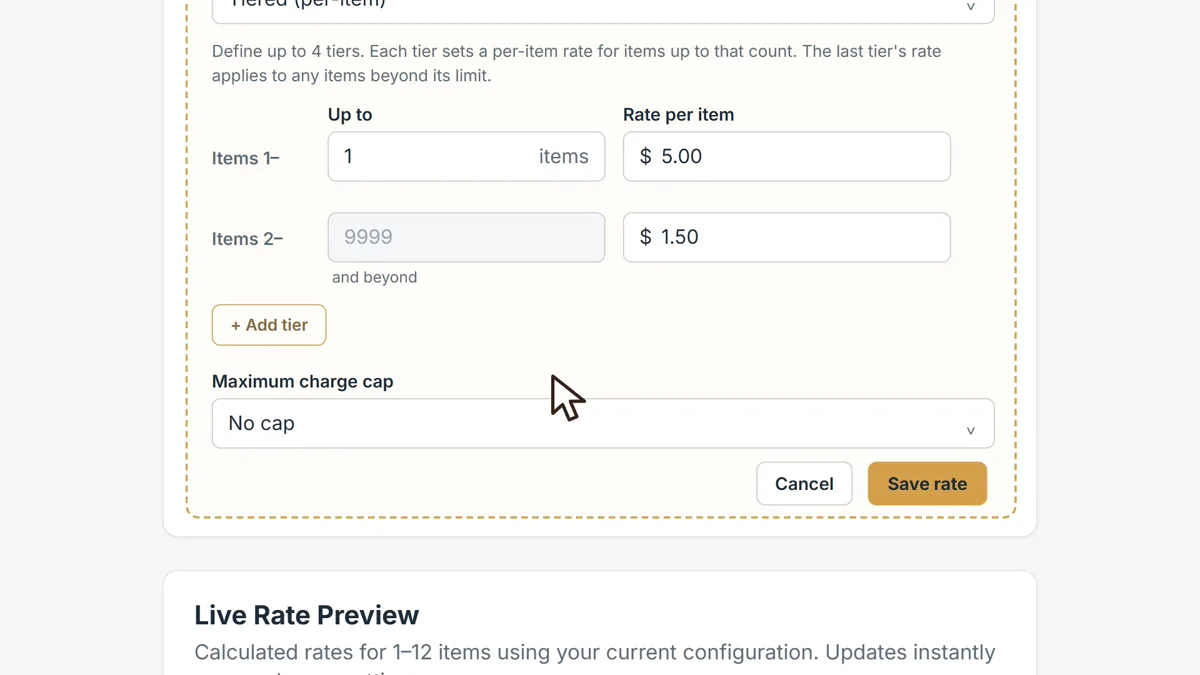
Set your tiers
Name a rate and give the first item one price and every item after another. Add a cap if you like.
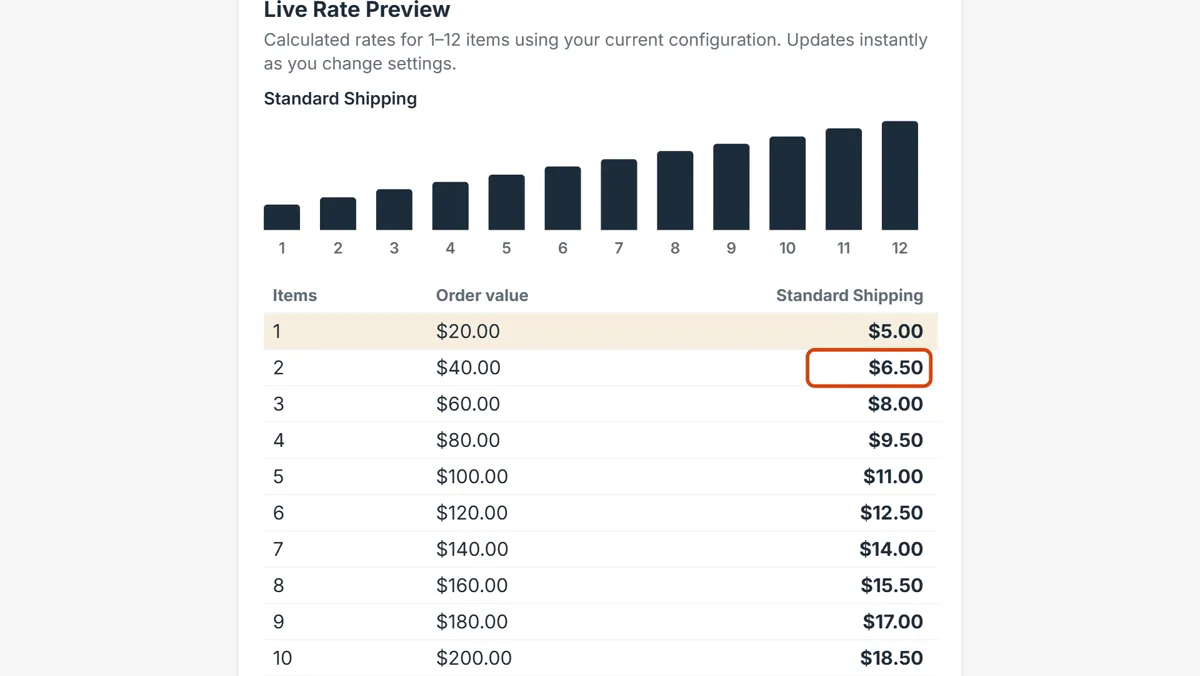
Check the preview
The Live Rate Preview shows exactly what a customer pays for 1 to 12 items, before you save.
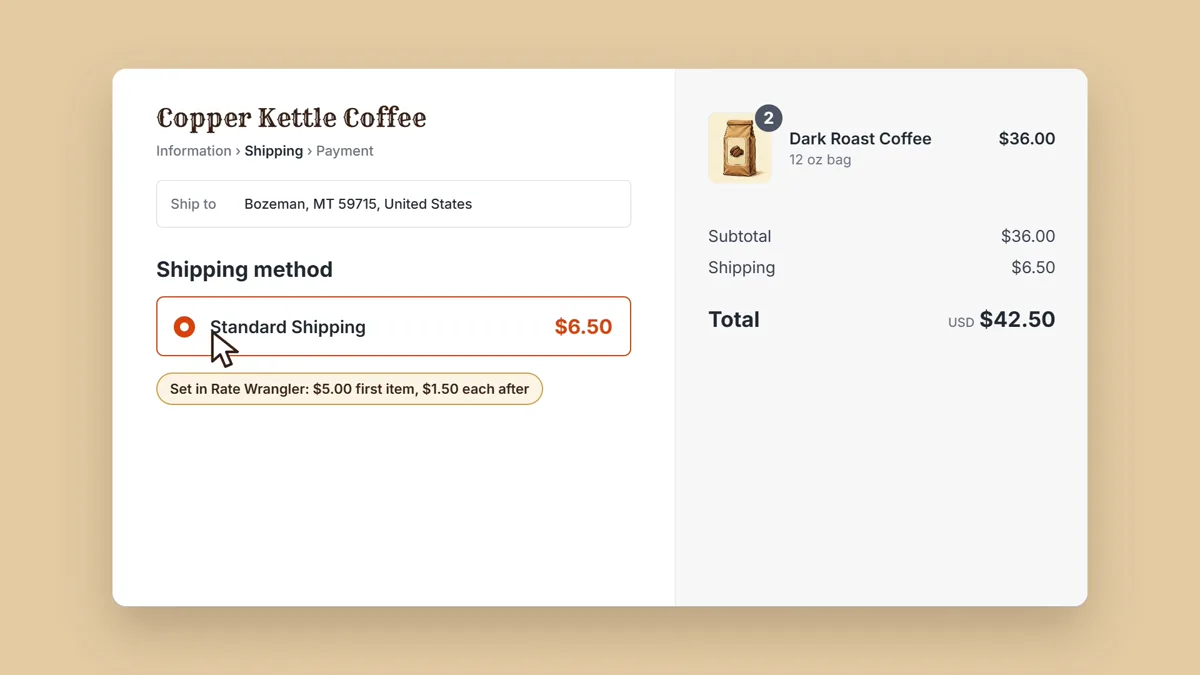
Customers see it at checkout
Shopify asks Rate Wrangler for rates, and your customer sees the price you set. Two items, $6.50.
What it does
Everything you need, nothing you don’t
Per-item tiers
Up to four tiers: a price for the first item, less for each one after. Cap it by dollars or by item count.
Free shipping on the whole cart
A free-shipping threshold counts the full cart, even when the order ships from two locations.
Weight surcharges
Add a surcharge for heavy items by weight threshold. Shopify sends the weights, so there is nothing to tag.
Handling fees and minimums
Add a handling fee to every order, or hide Rate Wrangler rates below a minimum order value.
Live Rate Preview
See what customers pay for 1 to 12 items as you change any setting, before you save.
Ready for market-driven shipping
Works on stores using Shopify Markets for shipping, through its own app shipping profile.
Shipping-rate apps commonly start at $29 a month. Rate Wrangler starts free, and Unlimited is $9.
Pricing
Start free, stay simple
Free
- 500 rate quotes a month (about 150 orders)
- Go over? Rates keep working at checkout
- Every feature included
Unlimited
- Unlimited rate quotes
- Every feature included
- Billed through Shopify, cancel any time
Questions
Before you saddle up
What is a rate quote?
Each time a checkout asks for shipping prices, that is one rate quote. A typical order uses about three, because checkout asks again as the shopper edits the address, which is why 500 quotes is about 150 orders.
What happens if I go over the free plan?
Nothing breaks. Rate Wrangler keeps returning rates at checkout and shows a banner in the app asking you to upgrade to Unlimited for $9 a month.
Which Shopify plans does it work on?
Shopify lets apps calculate shipping at checkout on the Advanced plan, on Shopify Plus, and on any plan billed annually. If your plan doesn’t allow it, Rate Wrangler saves your settings and tells you plainly, and starts working once your plan allows it.
Does it work with market-driven shipping?
Yes. On stores using Shopify Markets for shipping, Rate Wrangler adds its own shipping profile, so its rates show up in your markets automatically.
My store isn’t on market-driven shipping yet. What do I do?
Add Rate Wrangler to your shipping rates once: in Shopify, open Settings, then Shipping and delivery, then your General shipping rates, and in each zone choose Add rate, Use carrier or app to calculate rates, Rate Wrangler. The app checks this for you and tells you if anything is missing.
Does it charge shipping twice when an order ships from two locations?
No. When a cart ships from more than one location, Shopify asks for a rate once per location. Rate Wrangler recognizes the parts of the same checkout and prices them as one order, so a two-item cart pays the two-item rate.
Taking the weight off shipping
Free for 500 rate quotes a month. Set up in minutes.
Install on Shopify